Monday, 12 February 2024

Understanding why data scientists use machine learning

The Role of Machine Learning in Data Science
54 b

Data Science is all about generating insights from raw data. This can be achieved by exploring data at a very granular level and understanding the trends. Machine learning finds hidden patterns in the data and generates insights that help organizations solve the problem.

The role of Machine learning in Data Science comes into play when we want to make accurate estimates about a given set of data, such as predicting whether a patient has cancer or not.

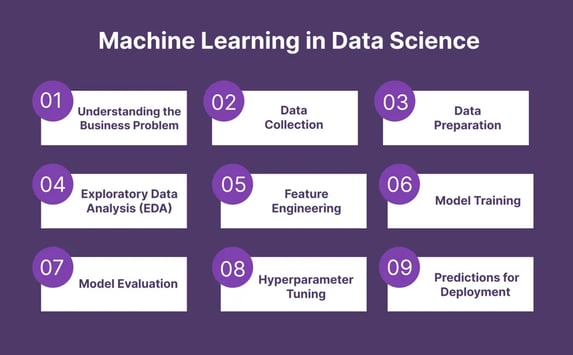
The role of machine learning in Data Science occurs in 9 steps:

1. Understanding the Business Problem


To build a successful business model, it’s very important to understand the business problem that the client is facing. Suppose the client wants to predict whether the patient has cancer or not. In such scenario, domain experts understand the underlying problems that are present in the system.
 

2. Data Collection

After understanding the problem statement, you have to collect relevant data. As per the business problem, machine learning helps collect and analyze structured, unstructured, and semi-structured data from any database across systems. 


3. Data Preparation

The first step of data preparation is data cleaning. It is an essential step for preparing the data. In data preparation, you eliminate duplicates and null values, inconsistent data types, invalid entries, missing data, and improper formatting. 


4. Exploratory Data Analysis (EDA)

Exploratory Data Analysis lets you uncover valuable insights that will be useful in the next phase of the Data Science lifecycle. EDA is important because, through EDA, you can find outliers, anomalies, and trends in the dataset. These insights can be helpful in identifying the optimal number of features to be used for model building. 


5. Feature Engineering

Feature engineering is one of the important steps in a Data Science Project. It helps in creating new features, transforming and scaling the features. In this domain, expertise plays a key role in generating new insights from the data exploration step. 


6. Model Training


In Model training, we fit the training data; this is where “learning” starts. We train the model on training data and test the performance on testing data i.e., unseen data. 


7. Model Evaluation

Once Model Training is done, it’s time to evaluate its performance. So, evaluating your Model on a new dataset will give you an idea of how your Model is going to perform in future data. 


8. Hyperparameter Tuning

After the Model is trained and evaluated, the performance of the Model can be again improved by tuning its parameter. Hyperparameter tuning of the model is important to improve the overall performance of the model. 


9. Making Predictions and Ready to be Deployed

This is the final stage of machine learning. Here, the machine answers each of your questions by its learning. After making accurate predictions, the Data Model is deployed into production.

Data scientists use machine learning for a variety of reasons, but here are some of the most important ones:

1. To extract insights from large datasets: Machine learning algorithms can analyze massive amounts of data much faster and more efficiently than humans can. This allows data scientists to discover hidden patterns, trends, and relationships that might otherwise go unnoticed. These insights can be used to inform business decisions, improve product development, personalize customer experiences, and much more.

2. To make predictions: Machine learning models can be trained to learn from historical data and then use that knowledge to make predictions about the future. This can be useful for tasks like forecasting sales, predicting customer churn, or identifying potential fraud.

3. To automate tasks: Machine learning can automate many repetitive and time-consuming tasks that data scientists would otherwise have to do manually. This frees up their time to focus on more strategic work, such as interpreting results and communicating insights to stakeholders.

4. To handle complex data: Machine learning can be used to analyze complex and unstructured data, such as text, images, and audio. This type of data can be difficult to analyze using traditional methods, but machine learning algorithms are able to extract valuable insights from it.

5. To improve accuracy and efficiency: Machine learning models can often achieve higher accuracy and efficiency than traditional data analysis methods. This is because they can learn and improve over time, as they are exposed to more data.

Sunday, 11 February 2024

Interfaces to the outside world

Data are read in using connection interfaces. Connections can be made to files (most common) or to other more exotic things.

  • file, opens a connection to a file
  • gzfile, opens a connection to a file compressed with gzip
  • bzfile, opens a connection to a file compressed with bzip2
  • url, opens a connection to a webpage

In general, connections are powerful tools that let you navigate files or other external objects. Connections can be thought of as a translator that lets you talk to objects that are outside of R. Those outside objects could be anything from a data base, a simple text file, or a a web service API. Connections allow R functions to talk to all these different external objects without you having to write custom code for each object.

1.File Connections

Connections to text files can be created with the file() function.

> str(file)
function (description = "", open = "", blocking = TRUE, encoding = getOption("encoding"), 
    raw = FALSE, method = getOption("url.method", "default"))  

The file() function has a number of arguments that are common to many other connection functions so it’s worth going into a little detail here.

  • description is the name of the file
  • open is a code indicating what mode the file should be opened in

The open argument allows for the following options:

  • “r” open file in read only mode
  • “w” open a file for writing (and initializing a new file)
  • “a” open a file for appending
  • “rb”, “wb”, “ab” reading, writing, or appending in binary mode (Windows)

In practice, we often don’t need to deal with the connection interface directly as many functions for reading and writing data just deal with it in the background.

For example, if one were to explicitly use connections to read a CSV file in to R, it might look like this,

> ## Create a connection to 'foo.txt'
> con <- file("foo.txt")       
> 
> ## Open connection to 'foo.txt' in read-only mode
> open(con, "r")               
> 
> ## Read from the connection
> data <- read.csv(con)        
> 
> ## Close the connection
> close(con)                   

which is the same as

> data <- read.csv("foo.txt")

In the background, read.csv() opens a connection to the file foo.txt, reads from it, and closes the connection when it’s done.

The above example shows the basic approach to using connections. Connections must be opened, then the are read from or written to, and then they are closed.

2. Reading Lines of a Text File

Text files can be read line by line using the readLines() function. This function is useful for reading text files that may be unstructured or contain non-standard data.

> ## Open connection to gz-compressed text file
> con <- gzfile("words.gz")   
> x <- readLines(con, 10) 
> x
 [1] "1080"     "10-point" "10th"     "11-point" "12-point" "16-point"
 [7] "18-point" "1st"      "2"        "20-point"

For more structured text data like CSV files or tab-delimited files, there are other functions like read.csv() or read.table().

The above example used the gzfile() function which is used to create a connection to files compressed using the gzip algorithm. This approach is useful because it allows you to read from a file without having to uncompress the file first, which would be a waste of space and time.

There is a complementary function writeLines() that takes a character vector and writes each element of the vector one line at a time to a text file.

3.Reading From a URL Connection

The readLines() function can be useful for reading in lines of webpages. Since web pages are basically text files that are stored on a remote server, there is conceptually not much difference between a web page and a local text file. However, we need R to negotiate the communication between your computer and the web server. This is what the url() function can do for you, by creating a url connection to a web server.

This code might take time depending on your connection speed.

> ## Open a URL connection for reading
> con <- url("https://www.jhu.edu", "r")  
> 
> ## Read the web page
> x <- readLines(con)                      
> 
> ## Print out the first few lines
> head(x)                                  
[1] "<!doctype html>"                    ""                                  
[3] "<html class=\"no-js\" lang=\"en\">" "  <head>"                          
[5] "    <script>"                       "    dataLayer = [];"               

While reading in a simple web page is sometimes useful, particularly if data are embedded in the web page somewhere. However, more commonly we can use URL connection to read in specific data files that are stored on web servers.

Using URL connections can be useful for producing a reproducible analysis, because the code essentially documents where the data came from and how they were obtained. This is approach is preferable to opening a web browser and downloading a dataset by hand. Of course, the code you write with connections may not be executable at a later date if things on the server side are changed or reorganized.

Latest Notifications

More

Results

More

Timetables

More

Latest Schlorships

More

Materials

More

Previous Question Papers

More

All syllabus Posts

More

AI Fundamentals Tutorial

More

Data Science and R Tutorial

More
Top